
Many businesses begin social media simply. Someone on the marketing team creates a few accounts and posts when there is something to share.
As the business grows, this becomes harder to manage. There are more platforms, more messages, and more customer comments. Teams also need clear data to understand what is working.
Without a system, people jump between platforms, posts are missed, and reporting takes a lot of manual work.
The point at which managing multiple social media accounts becomes difficult for growing businesses is usually when a social media management platform becomes necessary. Zoho Social is built for that purpose.
This guide explains what Zoho Social is, how it works, and how businesses can use Zoho Social media management to organise publishing, monitoring, and reporting more effectively.
Why Businesses Need a Social Media Management Platform
Managing social media manually may work for a small team using one platform. As a business grows and uses more networks, things become harder to control. The case for Zoho Social media management becomes clear when teams are running three or more active accounts simultaneously.
Managing multiple social media accounts
Most companies use several social platforms such as LinkedIn, Facebook, Instagram, and X. Each platform has different posting styles and different audiences.
Switching between them all day slows down the marketing team. A social media management platform lets teams manage all accounts from one dashboard.
Coordination between marketing teams
Social media usually involves more than one person. Writers, designers, and managers often work together on campaigns.
Without a system, content is shared through emails or chat messages. This makes approvals slow and confusing. A social media platform creates a clear workflow for writing, reviewing, approving, and publishing posts.
Lack of centralised reporting
Marketing leaders need to know if campaigns are working. When teams pull data from each social platform separately, reporting takes time and the numbers are hard to compare.
A central reporting system brings all performance data into one place.
What Is Zoho Social Media Management Software
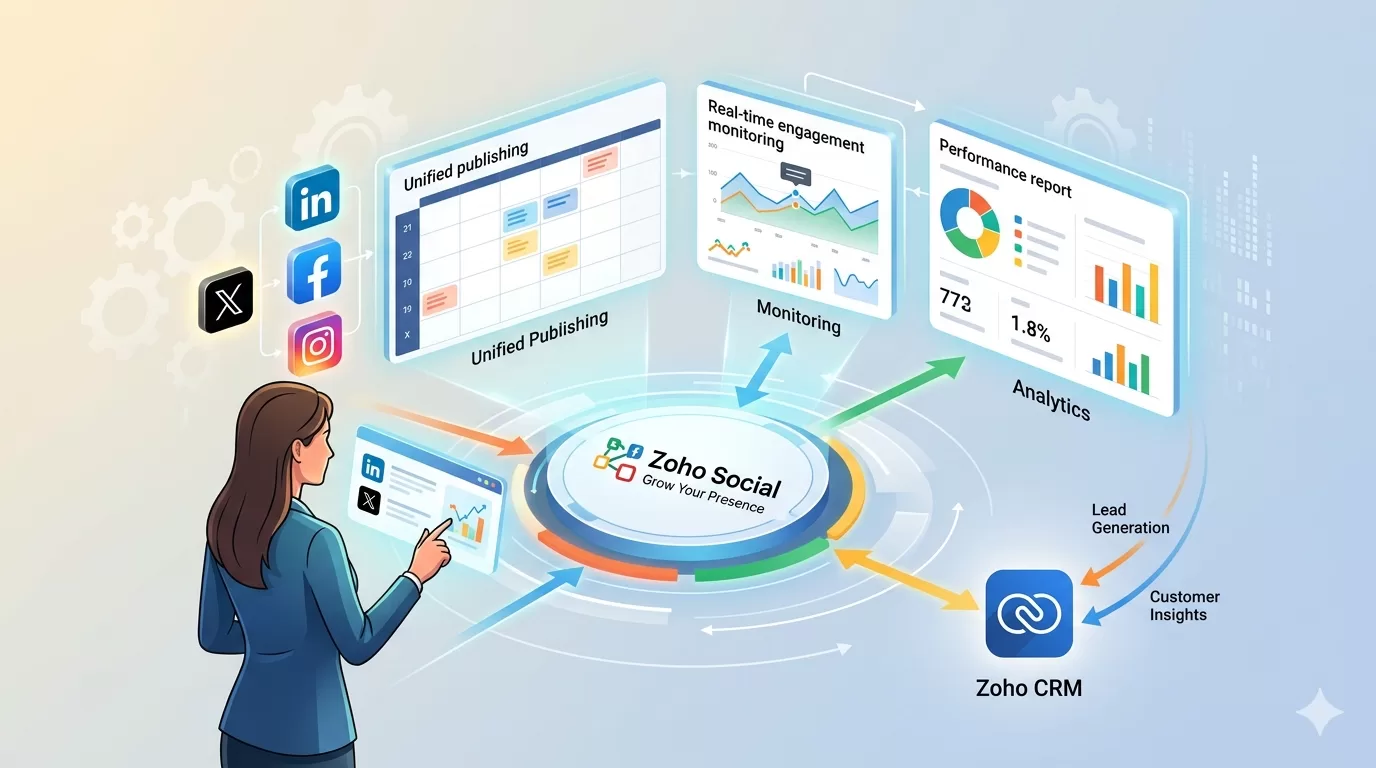
Zoho Social is a platform that helps businesses manage social media from one system. It allows teams to schedule posts, monitor conversations, and measure results across different networks.
Overview of the Zoho Social platform
Zoho Social gives marketing teams one workspace for social media. From this dashboard, teams can plan posts, publish content, respond to comments, and track results.
How Zoho Social fits into the Zoho ecosystem
Zoho Social is one application within the broader Zoho ecosystem, which covers CRM, marketing automation, analytics, and customer support.
Zoho’s social media integration across these tools is what separates it from standalone social scheduling software.
Key Capabilities of Zoho Social
Zoho Social provides several tools that help businesses manage social media in an organised way.
Social media publishing and scheduling
Teams can plan posts ahead of time and schedule them for different platforms. This helps maintain a consistent posting schedule without logging into each network separately.
Monitoring brand mentions and conversations
Customers often comment, ask questions, or mention brands online. Zoho Social allows teams to monitor these conversations and reply from one place, keeping response times low.
Zoho Social analytics and reporting
Zoho Social analytics provides reports that show engagement, reach, and post performance across all connected networks.
For businesses that need deeper cross-channel measurement, Zoho Social connects with Zoho Analytics, enabling social data to feed into broader reporting dashboards.
Team collaboration and approval workflows
Several people may be involved in creating content. Zoho Social supports teamwork through shared workspaces and approval steps before posts are published.
How Zoho Social Supports Marketing Operations
Zoho Social helps marketing teams organise their daily work.
Campaign planning and publishing calendars
Teams can plan campaigns using a visual calendar. This helps everyone see what content is scheduled and when it will be published across each platform.
Performance tracking across campaigns
Reports show how posts and campaigns perform over time. This helps marketing leaders decide which strategies are working and where investment should shift.
Multi-brand and multi-account management
Some companies manage several brands or business units. Zoho Social allows teams to manage multiple accounts while keeping campaigns and analytics organised separately.
Zoho Social and CRM Integration
Social media can also support sales and customer relationships.
Capturing leads from social media
When Zoho Social connects with Zoho CRM, certain interactions can automatically be converted into leads.
Sales teams can follow up with those prospects directly from CRM without manual data transfer.
Tracking customer engagement history
Social conversations can also appear inside the CRM record. This helps teams see a full history of customer interactions.
Implementation Considerations for Businesses
Using a social media platform works best when the business has clear processes established before going live.
Defining social media workflows
Teams should decide how posts are created, approved, and monitored before setting up the system.
User roles and collaboration structure
Different people may create content, approve posts, or review reports.
Integration with existing marketing systems
Many businesses use CRM systems, analytics tools, and marketing platforms alongside Zoho Social.
Zoho software integration services cover how these tools connect.
Benefits of Using Zoho Social for Businesses
The benefits of using Zoho Social for business are massive. Here are some key advantages.
- Marketing teams can plan and publish content more easily across all platforms.
- Leaders gain clearer reporting about campaign results through Zoho Social analytics.
- Manual work for posting and monitoring decreases significantly.
- Social engagement connects with CRM data.
Only a certified Zoho Premium Partner can implement Zoho Social according to your specifications.
Limitations and Considerations
Zoho Social works best when it supports clear marketing processes.
Businesses with complex marketing systems may need additional integrations or workflow planning.
Why Businesses Work With Al Fahad IT Consulting
Setting up Zoho tools is not only about turning the software on. The system must align with how the business operates.
Al Fahad IT Consulting begins with discovery and process mapping to understand marketing workflows, reporting needs, and collaboration structures.
As an authorised Zoho implementation partner, the team configures the system to support your workflows.
Conclusion
As businesses grow, managing social media becomes harder without a structured system.
Zoho Social media management helps organise publishing, monitoring, and reporting across multiple platforms while giving marketing teams better visibility into campaign performance.
Frequently Asked Questions
What is Zoho Social used for?
Zoho Social helps businesses manage social media publishing, monitoring, and reporting from one platform.
Which social networks can Zoho Social manage?
Zoho Social supports networks such as LinkedIn, Facebook, Instagram, and X, depending on configuration.
Can Zoho Social integrate with Zoho CRM?
Yes. Zoho Social can connect with Zoho CRM so social interactions can become leads or customer records.
Is Zoho Social suitable for marketing teams?
Yes. It is designed for teams that manage several social media channels and need better coordination.
How long does it take to implement Zoho Social?
Implementation time depends on the number of accounts, workflows, and integrations required.


