
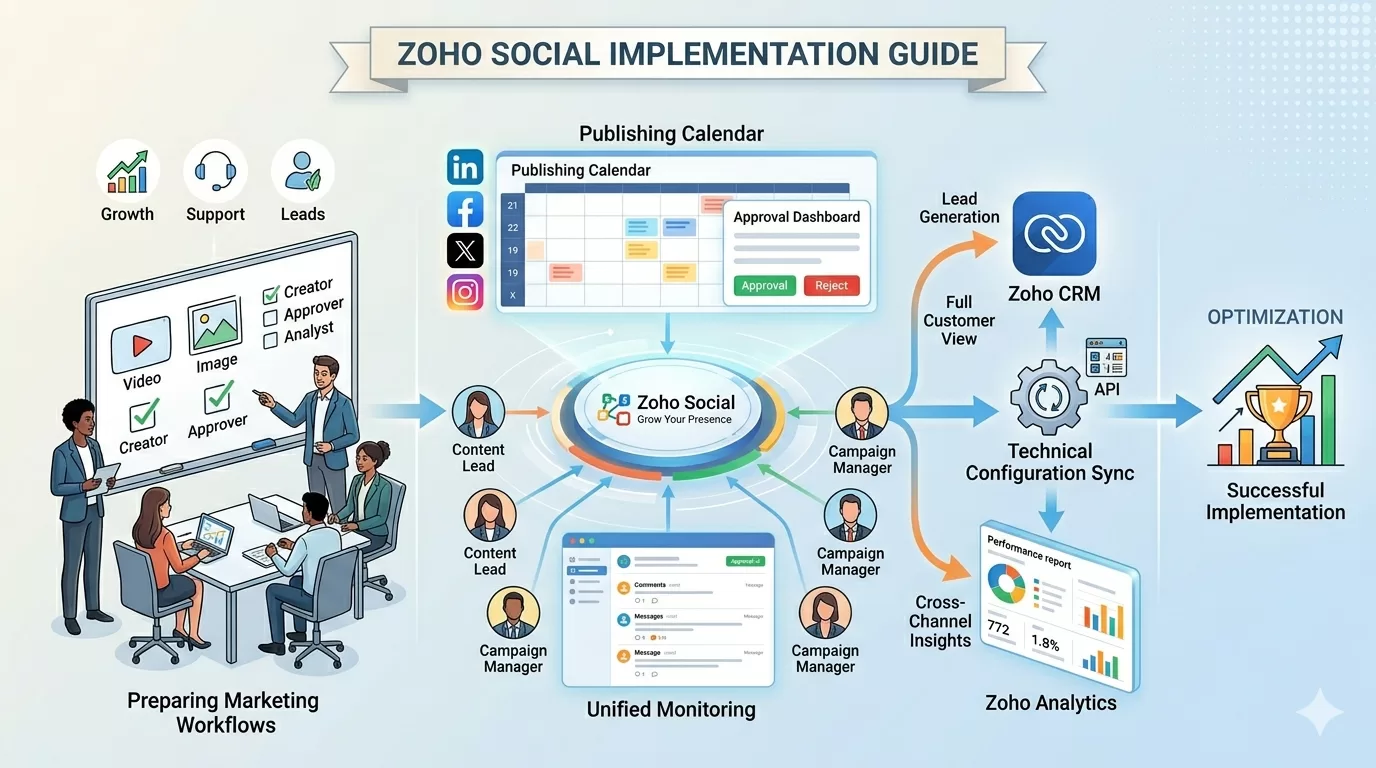
Social media management tools can improve how marketing teams plan, publish, and track campaigns. However, the benefits of these platforms depend heavily on how they are set up.
If a system is configured without clear workflows, teams may struggle with approvals, inconsistent posting, or unclear reporting.
Zoho Social provides tools for publishing, monitoring, collaboration, and Zoho Social analytics. But to use the platform effectively, businesses must first align it with their marketing processes. Understanding what each module does is a useful grounding before beginning configuration.
This guide explains the common steps businesses follow when setting up Zoho Social, from preparing marketing workflows to connecting social accounts and integrating the platform with CRM systems.
Preparing Your Business for Zoho Social Implementation
Before configuring Zoho Social, marketing teams should take time to define how social media is used in the organisation. Clear planning helps ensure the platform supports daily marketing activities.
Defining social media objectives
Social media can serve different purposes depending on the business. Common objectives include brand awareness, customer engagement, lead generation, product promotion, and customer support. Understanding the main goal of social media helps marketing teams plan campaigns and measure results.
Mapping social media workflows
Social media publishing usually involves several steps. Mapping the workflow from content creation through review, approval, publishing, and audience monitoring helps businesses design processes that Zoho Social can support effectively.
Identifying team roles and responsibilities
Growing marketing teams often involve multiple roles. Typical responsibilities may include content creation, campaign approvals, publishing posts, monitoring engagement, and analysing campaign performance. Defining these roles before implementation helps ensure smooth collaboration.
Creating and Configuring Your Zoho Social Account
Once planning is complete, businesses can begin configuring the platform.
Creating a Zoho Social workspace
The first step is creating the main Zoho Social workspace. This workspace becomes the central environment where marketing teams manage publishing, engagement, and Zoho Social analytics. From here, organisations can add users, connect social media accounts, and manage campaigns.
Connecting social media channels
Zoho Social allows businesses to connect their social media profiles. Common connections include LinkedIn company pages, Facebook business pages, Instagram business accounts, and X profiles. Once connected, teams can manage these accounts from one dashboard.
Setting up brand profiles
Some organisations manage several brands or business units. Zoho Social allows these brands to be organised separately within the same platform. This helps marketing teams manage multiple accounts without mixing campaigns or analytics.
Configuring Publishing and Scheduling Workflows
Publishing content is one of the main activities within Zoho Social. Setting up structured publishing workflows helps marketing teams maintain consistency.
Creating a social media publishing calendar
Content calendars help teams plan campaigns ahead of time. Marketing teams can schedule product announcements, promotional campaigns, company updates, and event promotions. A publishing calendar gives visibility into upcoming posts across all platforms.
Scheduling posts across multiple networks
Zoho Social allows posts to be scheduled in advance. A marketer can create a post once and schedule it for multiple social networks. This helps maintain consistent posting schedules and reduces the need for manual publishing.
Establishing content approval workflows
Many organisations require approval before publishing content. Zoho Social supports approval workflows where managers can review posts before they go live. This helps maintain brand consistency and reduces publishing errors.
Setting Up Monitoring and Engagement Tracking
Social media is not only about publishing content. It also involves ongoing engagement with audiences.
Monitoring comments and mentions
Customers often mention brands in posts or comments. Zoho Social allows marketing teams to monitor these interactions in a single dashboard. This helps teams respond quickly to questions or feedback without logging into each platform separately.
Managing incoming messages
Customers may also send direct messages through social platforms. Zoho Social allows teams to manage these messages from one place, making communication easier to track and assign to the right team member.
Configuring Social Media Analytics and Reporting
Measuring campaign performance is an important part of social media marketing. Zoho Social provides analytics tools that help teams evaluate results.
Setting up performance dashboards
Marketing leaders often need quick visibility into campaign performance. Zoho Social dashboards allow teams to monitor key metrics in one place. This helps leaders understand how campaigns perform across different platforms.
Tracking engagement and reach
Common social media performance indicators include engagement levels, audience reach, post performance, and follower growth. Tracking these metrics helps marketing teams refine their strategies over time. Zoho Social reports can be exported and shared with leadership for regular campaign reviews.
Integrating Zoho Social With Zoho CRM
Many businesses connect social media activity with customer relationship management systems. Zoho Social media integration with Zoho CRM is one of the most valuable configuration steps.
Capturing leads from social media interactions
When someone interacts with a brand on social media, that engagement may represent a potential lead. Linking Zoho CRM with Zoho Social means certain interactions can create lead records automatically, giving sales teams the ability to follow up without any manual data transfer. Zoho Social lead generation is particularly valuable for businesses running awareness campaigns on LinkedIn and Facebook.
Linking social engagement with customer records
Social interactions can also appear inside existing CRM records. This helps sales and support teams see a complete history of customer engagement, improving both follow-up quality and service continuity.
Common Implementation Challenges
Although Zoho Social is straightforward to use, some businesses face challenges during implementation.
Undefined marketing workflows
When marketing processes are unclear, the platform may be used inconsistently. Defining workflows before implementation helps avoid this problem.
Lack of team training
If team members are unfamiliar with the platform, they may continue using manual processes. Training ensures teams understand how to use scheduling, monitoring, and reporting tools effectively.
Integration complexity
Integrating social media platforms and CRM systems sometimes requires technical configuration. Planning these integrations early helps ensure smoother implementation. The Zoho software integration services overview covers the technical options available, including API connections and data sync configurations that affect how Zoho Social communicates with other tools in the business.
Best Practices for Successful Implementation
Several practices can help businesses implement Zoho Social successfully. These include establishing clear publishing guidelines, maintaining consistent campaign calendars, training marketing teams on platform features, and reviewing analytics regularly. The Zoho Social best practices guide goes into depth on each of these areas, including how to structure approval workflows and interpret analytics data for campaign decisions.
Why Businesses Work With Al Fahad IT Consulting
Implementing Zoho platforms often requires more than basic setup. Marketing systems must align with business processes, campaign structures, and reporting needs. Al Fahad IT Consulting helps organisations implement Zoho solutions through a structured consulting approach. As authorised Zoho partners across GCC, the team analyses marketing workflows, configures Zoho Social based on those workflows, integrates the platform with Zoho CRM and other systems, and provides ongoing optimisation and governance.
Frequently Asked Questions
How long does it take to set up Zoho Social?
Basic setup can be completed quickly. However, full implementation may take longer depending on workflows, integrations, and team structure.
Can multiple team members manage Zoho Social?
Yes. Zoho Social supports multiple users and allows teams to assign different roles and permissions.
Which social networks can be connected to Zoho Social?
Common integrations include LinkedIn, Facebook, Instagram, and X, depending on account types and platform policies.
Can Zoho Social integrate with Zoho CRM?
Yes. Zoho Social can connect with Zoho CRM to link social media interactions with customer records.
Do businesses need technical expertise to implement Zoho Social?
Basic setup is simple. However, more complex configurations or integrations may benefit from professional guidance.
Conclusion
Social media management becomes more complex as businesses grow. A structured setup of Zoho Social helps marketing teams plan campaigns, publish content consistently, monitor engagement, and track performance.
When implemented with clear workflows and proper integration, the platform can significantly improve how organisations manage their social media operations.
| Related Reading |


