
Your accounting software has been working fine for years.
But if your business is VAT-registered in Saudi Arabia and generated more than SAR 375,000 in taxable revenue in 2022, 2023, or 2024, your current invoicing setup may no longer be legally valid.
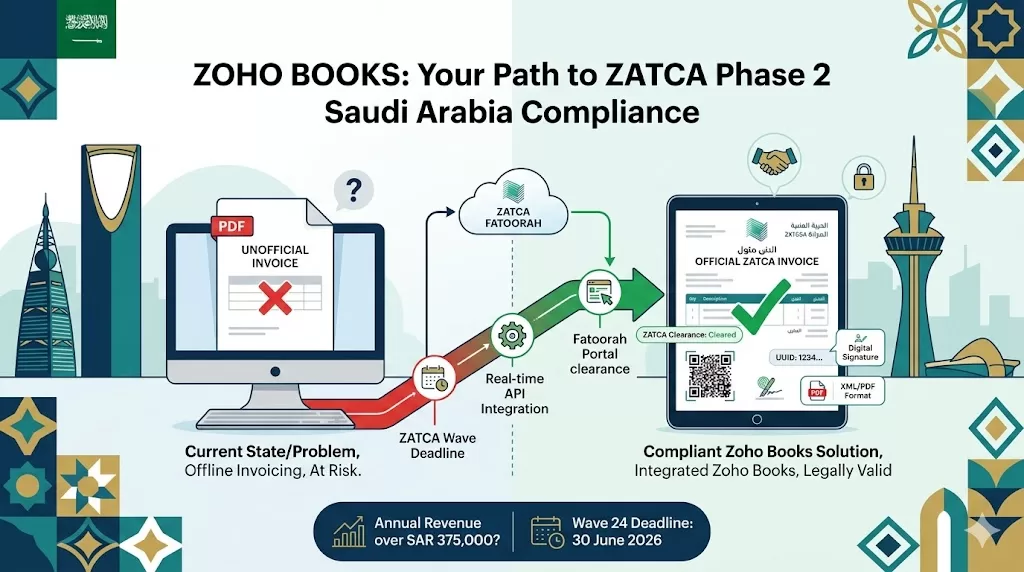
ZATCA Phase 2 does not just require digital invoices. It requires your accounting system to integrate directly with ZATCA’s Fatoorah platform in real time. If it cannot do that, you cannot issue legally valid B2B invoices in Saudi Arabia.
Zoho Books ZATCA Phase 2 Saudi Arabia compliance is built into the platform. This guide explains what Phase 2 requires, which wave applies to your business, and what correct Zoho Books configuration looks like in practice.
What Is ZATCA Phase 2 and How Is It Different from Phase 1?
Most businesses understood Phase 1. Stop using paper and handwritten invoices. Issue digital invoices instead. Store them securely. Add a QR code. Phase 1 was about the format of invoices.
Phase 2 is fundamentally different. It is not about how you generate invoices. It is about connecting your invoicing system directly to ZATCA’s Fatoorah platform so that every B2B invoice is cleared by ZATCA before it reaches your customer.
Phase 1 vs Phase 2 at a Glance
| Factor | Phase 1 (Generation) | Phase 2 (Integration) |
| Launched | 4 December 2021 | 1 January 2023 (Wave 1) |
| What it requires | Digital invoice generation and storage | Real-time integration with Fatoorah portal |
| Invoice format | Compliant digital format with QR code | XML or PDF/A-3 with embedded XML |
| Cryptographic stamp | Basic | Advanced: UUID and digital signature |
| Clearance required? | No | Yes: B2B invoices need ZATCA clearance before sending to buyer |
| Reporting required? | No | Yes: B2C simplified invoices reported within 24 hours |
| Applies to | All VAT-registered businesses | Rolled out in revenue-based waves |
Phase 2 means your accounting system must talk to ZATCA’s servers. A system that generates a PDF invoice and emails it to a customer does not meet Phase 2 requirements, regardless of how professional the invoice looks.
ZATCA Phase 2 Rollout Waves: Which One Applies to You?
ZATCA rolls out Phase 2 in waves based on annual VAT-taxable revenue. Wave 24 covers businesses with SAR 375,000 to SAR 750,000 in turnover during 2022, 2023, or 2024, with a deadline of 30 June 2026. This means Phase 2 now applies to virtually every VAT-registered business in Saudi Arabia.
Recent Waves and Their Deadlines
| Wave | Revenue Threshold (2022–2024) | Integration Deadline |
| Wave 22 | SAR 1M – SAR 1.25M | 31 December 2025 |
| Wave 23 | SAR 750K – SAR 1M | 31 March 2026 |
| Wave 24 | SAR 375K – SAR 750K | 30 June 2026 |
ZATCA has also extended its penalty waiver initiative until 30 June 2026, giving businesses a final window to integrate and correct past errors without financial penalties. After that date, the full penalty framework applies.
Key Rule: Notification Comes Six Months Before Deadline
ZATCA notifies taxpayers of their Phase 2 wave at least six months in advance. Receiving a notification means your deadline is already set. Businesses that wait for the notification before starting preparation consistently run out of time.
Zoho Books Riyadh, Jeddah, and Dammam businesses in later waves should begin configuration before the notification arrives, not after.
Is Zoho Books ZATCA Phase 2 Compliant?
Yes. Zoho Books is a ZATCA-approved VAT and e-invoicing application that provides the capability to directly push e-invoices to the ZATCA system in real time.
Zoho Books handles every technical requirement of Phase 2:
- Invoice generation in the required XML and PDF/A-3 format
- UUID generation for each invoice (unique identifier required by ZATCA)
- Cryptographic digital signature on every invoice
- QR code inclusion as mandated by ZATCA regulations
- Direct push to the Fatoorah portal via API
- Clearance status retrieval and invoice record update
- Automated reporting of B2C simplified invoices within 24 hours
- Arabic and bilingual invoice output
Zoho Books e-invoicing capability is available from the Standard plan onwards. Businesses on lower-tier plans need to confirm their plan includes ZATCA integration before going live.
What ZATCA Phase 2 Requires in Every Invoice
Understanding what Phase 2 requires technically helps you verify that your Zoho Books configuration is complete. A partial setup is as non-compliant as no setup at all.
Mandatory Invoice Fields Under Phase 2
Seller Information
- VAT registration number (TRN)
- Commercial registration number
- Address details in Arabic
- Seller name in Arabic
Invoice Details
- UUID: unique identifier generated per invoice
- Invoice sequence number
- Invoice date and time stamp
- Invoice type code: standard tax invoice or simplified tax invoice
- Currency code
Line Item Details
- Item description
- Quantity and unit price
- VAT rate applied per line
- VAT amount per line
- Discount amount if applicable
Security Elements
- Cryptographic digital signature
- QR code containing seller VAT number, invoice total, VAT amount, and timestamp
- Hash of previous invoice (chain integrity)
B2B Standard Tax Invoice vs B2C Simplified Tax Invoice
This distinction matters for how and when Zoho Books pushes invoices to Fatoorah.
| Invoice Type | Used For | ZATCA Requirement |
| Standard Tax Invoice | B2B transactions | Must be cleared by ZATCA before sending to buyer |
| Simplified Tax Invoice | B2C transactions | Must be reported to ZATCA within 24 hours of sending |
How Zoho Books Connects to the ZATCA Fatoorah Portal
The connection between Zoho Books ZATCA integration and Fatoorah is API-based. Zoho Books does not require a third-party middleware. The integration is native within the platform.
The Invoice Flow in Zoho Books
Zoho books make invoice creation simple with 5 easy steps.
Step 1: Invoice Creation
An invoice is created in Zoho Books with all mandatory ZATCA fields populated. Zoho Books validates the invoice data before allowing submission.
Step 2: Push to Fatoorah
The invoice is pushed to the Fatoorah portal via the ZATCA API. In Zoho Books, invoices can be pushed to the Fatoorah portal based on your configured preference. You can set this to: create as a draft and push manually, create and push automatically, or create, charge, push, and send automatically.
Step 3: Clearance
ZATCA validates the invoice against its technical standards and returns a status: cleared, conditionally approved, or rejected.
Step 4: Status Update
The clearance status updates in Zoho Books automatically. Cleared invoices can be sent to the buyer. Rejected invoices are flagged for correction and resubmission.
Step 5: Buyer Delivery
The cleared invoice, now carrying ZATCA’s cryptographic stamp, is sent to the buyer.
What Happens When ZATCA Rejects an Invoice?
Rejection is not rare. It happens when invoice data does not match ZATCA’s validation rules: a wrong VAT number, a missing field, or a format error.
If an invoice push fails, the reason for failure is shown in Zoho Books. You can retry after getting the error rectified.
Common rejection causes businesses encounter include:
- TRN number format error
- Missing or incorrect buyer VAT number on B2B invoices
- Arabic translation of the seller’s address is absent
- Invoice sequence number gap or duplication
- Cryptographic stamp failure due to a configuration error
A rejection does not mean non-compliance if you correct and resubmit promptly. A rejection that is ignored, and the invoice sent to the buyer anyway, is a compliance violation.
Zoho Books Jeddah trading businesses processing high invoice volumes need automated retry logic and rejection monitoring more than lower-volume environments do. Al Fahad configures these workflows as part of every Saudi Zoho Books implementation.
ZATCA Non-Compliance Penalties
ZATCA imposes strict penalties on businesses that fail to comply with Phase 2:
- Non-compliance with real-time invoice reporting: fines from SAR 5,000 to SAR 50,000 per violation
- Failure to generate a compliant QR code: fines of up to SAR 10,000 per invoice
- Delayed or incorrect Fatoorah integration: additional penalties, including temporary VAT registration suspension
The financial penalty is the visible consequence. The operational consequence is worse: without an integrated and certified system, you cannot issue legally valid invoices in Saudi Arabia, which means your cash flow stops entirely until compliance is restored.
How to Configure Zoho Books for ZATCA Phase 2
Zoho Books is ZATCA-compliant out of the box. It works as intended only when configured correctly for your organisation. Incorrect configuration produces a system that appears to push invoices but fails validation at the Fatoorah portal.
Configuration Steps
Zoho Books can easily setup into your business in 7 steps for UAE, Saudi Arabia & Bahrain Businesses.
1. Organisation Setup
Ensure your Zoho Books organisation is set up under the Saudi Arabia edition. VAT registration number (TRN), commercial registration number, and Arabic address fields must be complete and accurate.
2. VAT Configuration
Configure your VAT settings with the correct tax rates: 15% standard rate, zero-rated categories, and exempt items configured accurately per your business activity.
3. ZATCA API Integration
Enable the ZATCA integration within Zoho Books and authenticate against the Fatoorah portal using your ZATCA credentials. This step requires Onboarding CSR (Certificate Signing Request) generation within Zoho Books and submission to ZATCA for approval.
4. Invoice Template Configuration
Configure invoice templates to include all mandatory Arabic fields, QR code placement, and the correct invoice type codes for your transaction types.
5. Push Preference Settings
Set your invoice push preferences based on your workflow: automatic push on approval, or manual push with review. High-volume Zoho Books Dammam and Riyadh businesses typically use automatic push to avoid bottlenecks in the finance team.
6. Sandbox Testing
Test the full invoice flow in ZATCA’s sandbox environment before going live. A complete test covers: invoice creation, push, clearance, rejection handling, and credit note processing.
7. Go-Live and Monitoring
Go live on the configured environment. Set up rejection alerts so the finance team is notified immediately if a push fails.
What a Zoho Books ZATCA Implementation Looks Like
Getting Zoho Books ZATCA-ready is not a self-service task for most businesses. The configuration steps are technically specific, and errors discovered after go-live carry compliance risk.
Al Fahad IT Consulting delivers Zoho Books Saudi Arabia ZATCA Phase 2 implementations covering:
- Organisation and VAT setup review and correction
- ZATCA API onboarding and CSR generation
- Fatoorah sandbox testing and go-live sign-off
- Invoice template configuration in Arabic and English
- Staff training for finance teams in Riyadh, Jeddah, and Dammam
- Ongoing monitoring and compliance updates as ZATCA standards evolve
ZATCA technical standards are updated regularly. Each update requires the integration to be retested. A one-time implementation that is never maintained is a compliance risk waiting to materialise.
Frequently Asked Questions
Does ZATCA Phase 2 apply to my business if my revenue is below SAR 1 million?
Yes. Wave 24 includes all taxpayers whose revenues subject to VAT exceeded SAR 375,000 during 2022, 2023, or 2024, with a deadline of 30 June 2026. If your business is VAT-registered and generated more than SAR 375,000 in any of those three years, you are in scope.
Can I push old invoices to ZATCA retroactively?
ZATCA Phase 2 has no specific requirement to retroactively push old invoices to the Fatoorah portal unless they are part of ongoing transactions or required for tax compliance. The focus is on ensuring all future invoices are compliant from your wave deadline onward.
Does Zoho Books ZATCA Phase 2 support recurring invoices?
If you have created a recurring invoice, the invoice will be pushed automatically to the Fatoorah portal, depending on the preference you have configured. Recurring invoices follow the same push rules as standard invoices: automatically pushed on creation if that preference is set.
Can invoices be issued in English only, or must they be in Arabic?
ZATCA requires businesses to push B2B and B2C invoices in Arabic or bilingual, including English, in adherence to ZATCA’s e-invoicing rules. English-only invoices do not meet Phase 2 requirements. Zoho Books supports bilingual invoice output natively.
What is the difference between a ZATCA-compliant system and a ZATCA-integrated system?
A compliant system generates invoices in the correct format. An integrated system goes further: it connects to the Fatoorah portal via API, submits invoices for real-time clearance, and receives clearance status.
Phase 2 requires integration, not just compliance. A system that generates correct XML invoices but does not push them to Fatoorah does not meet Phase 2 requirements.
Does Oracle Cloud Integration also handle ZATCA for Oracle ERP users?
Yes. Businesses running Oracle ERP alongside Zoho Books can use Oracle Integration Cloud to manage the ZATCA connection from their Oracle environment. Our guide on Oracle Cloud Integration covers how OIC connects Oracle Fusion to the ZATCA Fatoorah portal.
Get Your Zoho Books ZATCA Configuration Right
Zoho Books ZATCA Phase 2 Saudi Arabia compliance is achievable. Configuration errors are common, and the consequences are serious.
Al Fahad IT Consulting is a Zoho Premium Partner with active ZATCA implementation experience across Riyadh, Jeddah, and Dammam. Our Saudi Arabia finance team configures, tests, and maintains Zoho Books ZATCA integrations for businesses across every wave of the Phase 2 rollout.
نتحدث العربية. تواصل معنا عبر واتساب للحصول على استشارة مجانية في تهيئة زوهو بوكس لمتطلبات هيئة الزكاة والضريبة والجمارك
Al Fahad IT Consulting is a Zoho Premium Partner and Oracle Partner Network member, providing Zoho Books implementation and ZATCA compliance services across Saudi Arabia, the UAE, and Bahrain.


