
Most CRM systems were built for Western sales teams in single-language, single-currency environments.
Dubai is none of those things.
A sales team in Dubai might have 15 nationalities, manage leads in Arabic and English simultaneously, close deals in AED and USD, and communicate almost entirely through WhatsApp. A generic CRM that cannot handle these realities creates more friction than it removes.
Zoho CRM Dubai is built for this environment. This guide explains what makes it work for UAE sales teams and what correct implementation looks like.
Why Generic CRMs Fail Dubai Sales Teams
The gap between a global CRM and a CRM configured for Dubai is not about features. It is about defaults.
A global CRM defaults to English, left-to-right text, a Western deal lifecycle, and email as the primary communication channel. None of these defaults fit how Dubai businesses actually operate.
What Dubai Sales Teams Actually Need
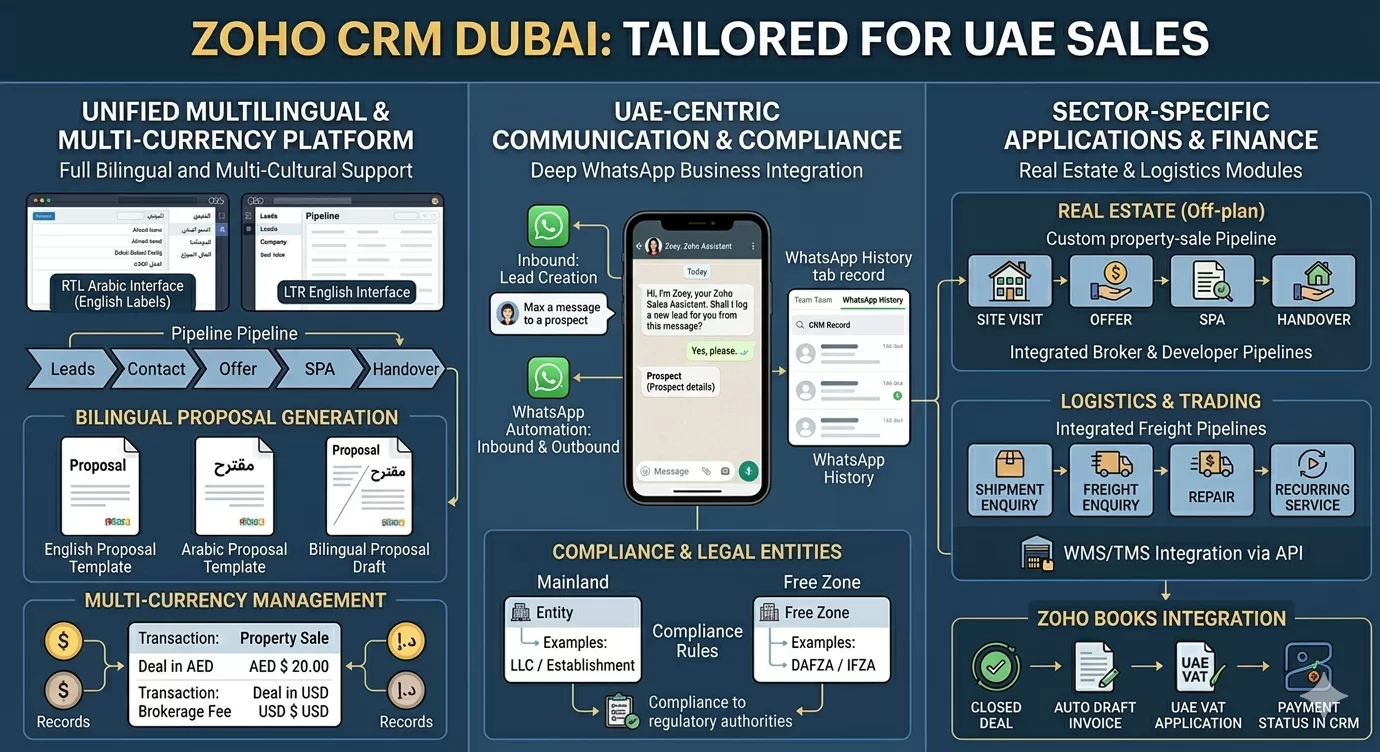
- Arabic and RTL support: Leads, contacts, and deal records in Arabic, with right-to-left text rendering across the interface
- WhatsApp as a lead channel: In UAE, over 78% of residents use WhatsApp daily for business. A CRM that does not capture WhatsApp conversations loses lead data constantly
- Multi-currency pipelines: Deals in AED, USD, EUR, and SAR happening simultaneously in the same team
- Bilingual document generation: Quotes and proposals in Arabic and English from the same record
- Free zone and mainland entity separation: Sales teams often manage different legal entities and compliance structures in parallel
Zoho CRM UAE addresses each of these by design. The platform supports an Arabic language interface with RTL text formatting, multi-currency transaction records, WhatsApp Business integration, and entity-level pipeline customisation.
What Zoho CRM Does: Core Capabilities
A scattered sales operation is the norm for many Dubai businesses before implementing a CRM: spreadsheets, shared inboxes, WhatsApp contact lists, with no single view of the pipeline.
Zoho CRM Dubai replaces that with a single operational system where every lead, deal, and customer relationship is managed in one place. It centralises lead data, automates follow-up tasks, tracks deals through your sales process, and generates reports on team and pipeline performance.
Core Modules in Zoho CRM
| Module | What It Manages |
| Leads | New enquiries from all channels: web, WhatsApp, trade shows, referrals |
| Contacts | Qualified individuals with active relationships |
| Accounts | Companies and business entities linked to contacts |
| Deals | Active sales opportunities with stage, value, and probability |
| Activities | Calls, emails, WhatsApp messages, meetings, and tasks |
| Reports | Pipeline analytics, team performance, conversion rates |
| Dashboards | Real-time visual summaries of sales activity and pipeline health |
Zoho CRM connects natively to the rest of the Zoho ecosystem. Leads flow into Zoho Campaigns for nurturing. Closed deals generate invoices in Zoho Books. Support requests create tickets in Zoho Desk. The platform works as an operational layer across the business, not just a contact database.
Arabic Language and Bilingual Interface in Zoho CRM
Zoho CRM supports Arabic language and right-to-left text formatting across the entire interface. This is not a translation overlay. It is a native Arabic experience built into the platform.
What Arabic Support Covers
- Full RTL interface: menus, forms, fields, and dashboards rendered right to left
- Arabic text entry in all record fields: lead name, company, notes, deal description
- Bilingual record views: Arabic and English fields on the same record
- Arabic email and WhatsApp templates for automated communications
- Arabic-language reports and dashboards for management review
Dubai sales teams managing Arabic-speaking clients alongside English-speaking ones can handle both workflows in a single CRM, without switching platforms or maintaining separate systems.
Zoho CRM and WhatsApp Integration for UAE Sales Teams
WhatsApp is not a messaging app for UAE businesses. It is a primary sales and customer communication channel.
Over 78% of UAE residents use WhatsApp daily for business interactions. A CRM that does not integrate with WhatsApp is a CRM that misses the majority of inbound sales conversations.
How Zoho CRM WhatsApp Integration Works
Zoho CRM integrates with WhatsApp Business through the official WhatsApp Business API. The integration allows:
- Inbound WhatsApp messages to create leads or contacts automatically in Zoho CRM
- WhatsApp conversation history is stored against the contact record, alongside emails and calls
- Outbound WhatsApp message sending from within Zoho CRM using approved templates
- Automated WhatsApp follow-up workflows triggered by CRM events: new lead, deal stage change, payment reminder
- Team inbox management: multiple agents handling WhatsApp conversations routed through Zoho CRM
For a Zoho CRM Dubai real estate or hospitality business, this means a WhatsApp enquiry from a prospect becomes a lead record instantly, complete with the conversation history, without anyone manually copying data between platforms.
Zoho CRM for Real Estate Businesses in Dubai
Real estate is Dubai’s most active CRM market. The sales cycle is long, the deal values are high, the pipeline is complex, and lead sources are diverse. A standard pipeline does not fit.
Zoho CRM Dubai real estate implementations configure the platform around the specific lifecycle of a Dubai property sale:
Real Estate CRM Configuration in Zoho CRM
- Lead capture: Aggregation from property portals (Bayut, Property Finder), website forms, WhatsApp, and referrals into a single lead queue
- Off-plan pipeline stages: Enquiry, Site Visit, Offer, SPA Signed, and Handover. Each stage has automated tasks and document checklists.
- Property inventory linkage: Zoho CRM connected to available unit lists so agents see real-time availability without leaving the CRM
- Broker and developer separation: Separate pipelines for broker relationships versus direct buyer management
- Post-sale owner communication: Automated milestone notifications for buyers: payment reminders, construction updates, and handover scheduling
- Commission tracking: Deal-level commission calculations linked to agent records and connected to Zoho Books for payment processing
Zoho CRM for Logistics and Free Zone Businesses
Zoho CRM JAFZA, DAFZA, and Dubai Airport Free Zone operators face a specific CRM challenge: managing B2B client relationships across freight, customs, and operational service lines simultaneously.
Logistics CRM Configuration in Zoho CRM
- Freight client pipeline: Shipment enquiry to contract to recurring service management
- Multi-service account management: Single account record tracking air freight, sea freight, and customs brokerage relationships
- SLA and contract renewal tracking: Automated alerts for contract expiry and renewal windows
- Integration with freight management systems: Zoho CRM connected to WMS and TMS platforms via API for operational data visibility within the CRM
- Rate quote generation: Quotes generated in Zoho CRM and connected to Zoho Books for invoice creation on shipment completion
Zoho CRM Abu Dhabi industrial and energy sector businesses follow the same configuration principles, with sector-specific modifications to deal stages, product catalogues, and approval workflows.
Connecting Zoho CRM to Zoho Books: Sales to Finance
Connecting Zoho CRM to Zoho Books is one of the highest-value steps in any Zoho implementation Dubai project. This eliminates the gap between the sales team closing a deal and the finance team generating an invoice.
What the CRM to Books Connection Enables
- A closed deal in Zoho CRM automatically creates a draft invoice in Zoho Books
- Contact and account data syncs between both systems: no duplicate entry
- Payment status in Zoho Books is visible within the Zoho CRM deal record
- Sales reports in Zoho CRM reflect invoiced revenue, not just pipeline estimates
- UAE VAT is applied automatically on invoices based on the contact’s tax registration status
This connection is particularly valuable for Zoho CRM Sharjah and Dubai trading businesses with high transaction volumes, where manual handoff between sales and finance creates errors and delays.
Businesses already running Zoho Books benefit from diverse features and applications for the finance configuration that sits alongside this CRM setup.
Zoho CRM vs Zoho CRM Plus: Which One Is Right?
The most common question at the start of a Zoho CRM implementation Dubai engagement is whether the business needs Zoho CRM or Zoho CRM Plus.
| Factor | Zoho CRM | Zoho CRM Plus |
| Core sales pipeline | ✅ | ✅ |
| Marketing automation | Basic | Advanced: Zoho Campaigns included |
| Customer support | Not included | Zoho Desk included |
| Social media monitoring | Not included | Zoho Social included |
| Advanced analytics | Standard reports | Zoho Analytics included |
| Surveys | Not included | Zoho Survey included |
| Best for | Sales-focused teams | Teams needing sales + marketing + support in one |
| Pricing | Per user, CRM only | Higher per-user, multi-app bundle |
Most Dubai SMEs and mid-market businesses start with Zoho CRM and upgrade to Zoho CRM Plus when marketing automation and customer support become operational priorities. Al Fahad’s recommendation is always based on your current workflows, not the higher-value licence.
What a Zoho CRM Dubai Implementation Involves
A Zoho CRM implementation in Dubai is not a software installation. It is a process redesign project that uses Zoho CRM as the execution layer.
Implementation Stages
- Discovery: Current sales process mapping, lead source audit, team structure review, and integration requirements identification.
- Configuration: Pipeline stage design, custom field setup, automation rule build, WhatsApp and email integration, and user role configuration.
- Data Migration: Import of existing contacts, accounts, and deal history from your current system: another CRM, spreadsheets, or a shared inbox.
- Integration: Connection to Zoho Books, WhatsApp Business, website lead forms, and any third-party platforms your team uses.
- Training: Role-based training in Arabic and English for sales reps, managers, and administrators.
- Go-Live and Support: Phased rollout with hypercare support during the first 30 days, covering adoption issues and configuration adjustments.
Zoho CRM Pricing for UAE Businesses
Zoho CRM pricing is per-user per-month, available on annual or monthly billing. Plans scale from Standard through Professional, Enterprise, and Ultimate. Zoho CRM Plus is a separate bundle pricing model.
Pricing is published in USD on Zoho’s global website. Al Fahad provides AED-equivalent pricing and GCC market context as part of every scoping conversation. UAE businesses should also factor in implementation consulting, data migration, and training costs alongside the licence fee.
A comparison of Oracle and Zoho platform investment across GCC is available in our guide on Zoho Books ZATCA Phase 2 Saudi Arabia, which covers the Zoho finance ecosystem in parallel detail.
Frequently Asked Questions
Does Zoho CRM support Arabic language in Dubai and UAE?
Yes. Zoho CRM Dubai supports a full Arabic language interface with right-to-left text rendering across all modules, including leads, contacts, deals, reports, and dashboards. Arabic email and WhatsApp templates can be configured for automated communications to Arabic-speaking prospects and clients.
Can Zoho CRM integrate with WhatsApp Business in the UAE?
Yes. Zoho CRM integrates with WhatsApp Business via the official Meta API. Inbound WhatsApp messages create CRM records automatically. Conversation history is stored against contact records. Outbound WhatsApp templates can be sent from within Zoho CRM. This is one of the most requested configurations in every Zoho CRM UAE implementation Al Fahad delivers.
Is Zoho CRM suitable for real estate businesses in Dubai?
Zoho CRM is one of the most widely deployed CRM platforms in Dubai’s real estate sector. The platform handles off-plan lead management, agent pipeline tracking, property inventory linkage, post-sale owner communication, and commission tracking when configured correctly for the real estate sales lifecycle.
How does Zoho CRM connect to Zoho Books for UAE VAT compliance?
Zoho CRM and Zoho Books integrate natively. Closed deals in Zoho CRM generate draft invoices in Zoho Books automatically. UAE VAT is applied based on the tax registration status. Payment status in Zoho Books is visible within the Zoho CRM deal record. This eliminates the data handoff between sales and finance teams.
What is the difference between Zoho CRM and Zoho CRM Plus?
Zoho CRM Plus bundles CRM with Zoho Campaigns, Zoho Desk, Zoho Social, Zoho Analytics, and Zoho Survey under a single per-user licence. Zoho CRM alone is the sales pipeline platform. Sales teams that have outgrown a pure sales pipeline tool and need integrated marketing, support, and analytics all in one place choose Zoho CRM UAE Plus. Businesses focused primarily on sales pipeline management typically start with standard Zoho CRM.
Talk to a Zoho CRM Partner in Dubai
Al Fahad IT Consulting is a Zoho Premium Partner that has been operating in the UAE since the Zoho ecosystem matured in the GCC market. Our Zoho implementation in Dubai experience spans real estate, logistics, financial services, and trading sectors.
Every engagement starts with a structured discovery of your current sales process. The CRM is configured around how your team actually sells, not around a generic template.
Book a free Zoho CRM consultation →
نتحدث العربية. تواصل معنا عبر واتساب للحصول على استشارة مجانية في تطبيق زوهو CRM
Al Fahad IT Consulting is a Zoho Premium Partner and Oracle Partner Network member, providing Zoho CRM implementation services across the UAE, Saudi Arabia, and Bahrain.


