
Most ZATCA compliance failures in Zoho Books are not software problems. They are setup problems.
Zoho Books is a ZATCA-approved platform. It generates the correct XML format, creates UUIDs, applies cryptographic stamps, and pushes invoices to the Fatoorah portal in real time. The platform works.
What does not always work is the configuration behind it.
- A business that skips the CSR onboarding step cannot push invoices.
- A business that has not configured Arabic seller address fields will get every invoice rejected.
- A business that goes live without sandbox testing will discover its errors through rejected invoices on real transactions.
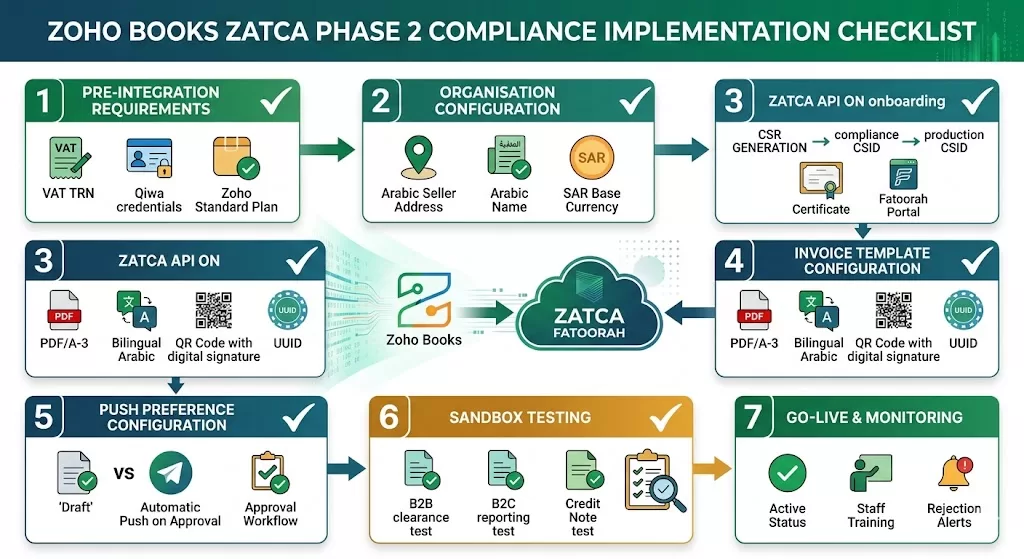
This checklist covers every step of a correct ZATCA integration checklist Zoho Books implementation, from organisation setup to go-live monitoring. Work through each item in sequence. Do not proceed to the next section until the current one is complete.
Section 1: Pre-Integration Requirements
Before touching Zoho Books, confirm the following are in place. Missing any of these creates delays that cannot be resolved inside the software.
1.1 ZATCA Registration
- Business is registered for VAT with ZATCA and holds a valid Tax Registration Number (TRN)
- TRN format is correct: 15 digits beginning with 3 and ending with 3
- ZATCA Fatoorah portal access is active and login credentials are available
- Business is aware of its wave notification date and integration deadline
- ZATCA penalty waiver window is noted: currently extended to 30 June 2026 for Wave 24 businesses
1.2 Business Information Ready
- Legal entity name in Arabic: exactly as registered with ZATCA
- Legal entity name in English
- Commercial Registration (CR) number
- VAT registration number (TRN)
- Full registered address in Arabic
- City and postal code
- Point of sale identifier (for businesses with multiple branches or locations)
1.3 Zoho Books Plan Confirmed
- Zoho Books subscription is on the Standard plan or above: ZATCA e-invoicing capability is available from the Standard plan onwards
- Organisation is set up as Saudi Arabia edition: not UAE or global edition
- Organisation currency is set to SAR
Section 2: Organisation Configuration in Zoho Books
Let’s look into the organization configuration checklist for Zoho Books ZATCA.
2.1 Organisation Setup
- Business location set to Saudi Arabia: this activates the ZATCA VAT module
- TRN entered correctly in organisation settings
- Legal name in Arabic entered in the Arabic name field: this is a mandatory ZATCA field on every invoice
- Registered address in Arabic entered completely: street, district, city, and postal code all required
- Financial year start date set correctly
- Base currency confirmed as SAR
2.2 VAT Configuration
- VAT enabled in Settings under Taxes
- Standard rate configured at 15%
- Zero-rated categories configured: exports, international transport, qualifying financial services
- Exempt categories configured where applicable
- Reverse charge configuration enabled for applicable transaction types
- VAT number field mapped to customer and supplier records
2.3 Customer and Supplier Records
- All VAT-registered customer TRNs entered: mandatory for B2B standard tax invoices
- Customer records flagged by invoice type: B2B (standard tax invoice) or B2C (simplified tax invoice)
- Supplier TRNs entered for VAT-registered vendors
- International supplier records marked correctly for reverse charge treatment
Section 3: ZATCA API Onboarding
This is the most technically critical section. The API onboarding process connects Zoho Books to the Fatoorah portal. Every step must be completed in sequence.
3.1 CSR Generation
- Navigate to Settings, then Integrations, then ZATCA E-Invoicing in Zoho Books
- Generate the CSR (Certificate Signing Request) within Zoho Books: do not generate this outside the platform
- Confirm the CSR includes the correct TRN, organisation name, and device identifier
- Download the CSR file for submission to ZATCA
3.2 ZATCA Portal Submission
- Log in to the ZATCA Fatoorah portal using your organisation credentials
- Navigate to the onboarding section and submit the CSR file
- ZATCA issues a Compliance CSID (Cryptographic Stamp Identifier): download and store this
- Submit the Compliance CSID back into Zoho Books to complete the onboarding link
3.3 Production CSID
- After Compliance CSID is confirmed, apply for the Production CSID from the Fatoorah portal
- Enter the Production CSID into Zoho Books
- Confirm the integration status shows as Active in Zoho Books ZATCA settings
- Note the device ID assigned: required for any future re-onboarding if the integration needs to be reset
Section 4: Invoice Template Configuration
ZATCA mandates specific fields on every invoice. An invoice missing any mandatory field will be rejected at the Fatoorah portal. Configure templates before testing.
4.1 Mandatory Invoice Fields
- Invoice number: sequential, no gaps permitted
- UUID: generated automatically by Zoho Books per invoice, confirm this is active
- Invoice date and time: timestamp in the correct format
- Invoice type code: standard tax invoice (388) for B2B, simplified tax invoice (381) for B2C
- Seller TRN: pulled from organisation settings automatically
- Seller name in Arabic
- Seller address in Arabic
- Buyer TRN: required on all B2B standard tax invoices
- Line item descriptions
- Unit price and quantity per line
- VAT rate per line
- VAT amount per line
- Total excluding VAT
- Total VAT amount
- Total including VAT
- QR code: generated by Zoho Books, includes seller TRN, invoice total, VAT amount, and timestamp
- Cryptographic stamp: applied by Zoho Books on approval
4.2 Invoice Format
- PDF output format set to PDF/A-3: as required by ZATCA regulations
- XML format embedded in PDF confirmed
- Bilingual output configured: Arabic fields present alongside English on the invoice template
- Invoice template reviewed by a ZATCA-familiar finance team member before testing begins
4.3 Credit Notes and Debit Notes
- Credit note configuration tested: IRN is generated for credit notes and they must also be pushed to Fatoorah
- Debit note configuration tested: same requirement applies
- Reference to original invoice number included on all credit and debit notes
Section 5: Push Preference Configuration
Zoho Books Saudi Arabia allows you to control when invoices are pushed to Fatoorah. The preference must match your business workflow.
5.1 Available Push Preferences
| Preference | What It Does | Best For |
| Create as Draft | Invoice created in draft, pushed manually via the Push to Fatoorah button | Low-volume businesses that review every invoice before submission |
| Create, Push, and Send | Invoice pushed to Fatoorah automatically on approval, then sent to buyer | Standard B2B workflow: ensures clearance before buyer receives invoice |
| Create, Charge, Push, and Send | Invoice charged, pushed, and sent automatically | Subscription and recurring billing workflows |
- Push preference selected based on your invoice volume and workflow
- Team briefed on which push preference is active and what it means for their invoice approval process
- Approval workflow configured if transaction approval is enabled: invoices can only be pushed after the final approver signs off
5.2 Recurring Invoice Configuration
- If recurring invoices are in use, confirm push preference applies to recurring invoices automatically
- Test a recurring invoice in sandbox before activating in production
Section 6: Sandbox Testing
Do not skip this section. Sandbox testing is the step that catches configuration errors before they become live compliance failures.
6.1 Sandbox Environment Setup
- ZATCA sandbox credentials obtained from the Fatoorah portal
- Zoho Books sandbox or test environment configured with sandbox CSID
- Sandbox is kept separate from the production environment throughout testing
6.2 Standard Tax Invoice Tests (B2B)
- Test invoice created with all mandatory fields populated
- Invoice pushed to Fatoorah sandbox: clearance status confirmed as approved
- Cleared invoice downloaded and reviewed: QR code, cryptographic stamp, UUID all present
- Rejection test: invoice pushed with a known error (wrong TRN format): rejection received and error message noted
- Correction and resubmission tested: invoice corrected and re-pushed successfully
6.3 Simplified Tax Invoice Tests (B2C)
- Simplified tax invoice created
- Invoice sent to customer (or test recipient)
- Invoice pushed to Fatoorah sandbox within 24 hours: reporting status confirmed
- Simplified invoice QR code confirmed present
6.4 Credit Note and Debit Note Tests
- Credit note created against a test invoice
- Credit note pushed to Fatoorah sandbox: IRN generated and clearance confirmed
- Debit note tested using the same process
6.5 Edge Case Tests
- Invoice with zero-rated line items: VAT amount is zero, QR code still generated
- Invoice in Arabic only: all mandatory Arabic fields rendering correctly
- Invoice with multiple line items at different VAT rates
- Large invoice value: no issues with number formatting in XML
Section 7: Go-Live Preparation
At last, the checklist before going live to ensure no problem occurs.
7.1 Production Environment Switch
- Sandbox CSID replaced with Production CSID in Zoho Books ZATCA settings
- Integration status confirmed as Active in production
- Finance team notified of go-live date and new invoice workflow
7.2 Staff Training
- Finance team trained on the push preference in use
- Team knows what a rejection error looks like and how to resolve it
- Clear escalation path established: who to contact if a push fails and cannot be resolved internally
- Arabic language fields on invoice templates verified by an Arabic-speaking team member
7.3 Monitoring Setup
- Rejection alert configured: who receives notifications when an invoice push fails
- Daily check process established for the first two weeks: confirm all invoices from the previous day have a cleared status
- Monthly reconciliation process defined: total invoices pushed versus total invoices cleared
Section 8: Post-Go-Live Maintenance
ZATCA integration is not a one-time task. ZATCA updates its technical standards regularly. Each update must be tested and applied.
8.1 Ongoing Compliance Obligations
- Monitor ZATCA technical standard update announcements: subscribe to ZATCA portal notifications
- When Zoho Books releases a ZATCA-related update, test in sandbox before applying to production
- Review rejection rates monthly: a rising rejection rate signals a configuration issue before it becomes a penalty
8.2 Record Keeping
- All pushed invoices are stored in Zoho Books with their clearance status: confirmed accessible for audit
- XML versions of invoices are accessible from within each invoice record
- Audit trail is active and shows all invoice creation, modification, and push events
8.3 New Invoice Types and Products
- When a new product or service line is added, its VAT treatment is confirmed before the first invoice is raised
- Any new zero-rated or exempt supply type is reviewed against ZATCA regulations before configuration
- New branch or location triggers a review of the point of sale identifier configuration
Common ZATCA Configuration Errors to Avoid
Based on live implementation experience across Riyadh, Jeddah, and Dammam, these are the most frequent configuration failures Al Fahad encounters when reviewing an existing Zoho Books ZATCA setup:
| Error | Why It Happens | How to Fix |
| Arabic seller name missing | Set up in English only, Arabic field left blank | Add Arabic legal name in organisation settings |
| Wrong TRN format | TRN entered with spaces or incorrect digit count | Re-enter as 15-digit number, no spaces |
| B2B invoices sent without clearance | Push preference set to Draft, team sending invoices manually before pushing | Change push preference or enforce mandatory approval before sending |
| Credit notes not pushed | Team not aware credit notes also require Fatoorah submission | Configure and train: IRN required for all credit notes |
| CSR generated outside Zoho Books | Using a third-party tool to generate CSR, then importing | Regenerate CSR inside Zoho Books: the device identifier must match |
| Sandbox skipped, errors found on live invoices | Go-live without testing to meet a deadline | Always test: errors on live invoices carry compliance risk |
Frequently Asked Questions
Do I need to use this checklist even if Zoho Books is already set up?
Yes, especially if Zoho Books is already set up. Many existing Saudi Arabia configurations were built before ZATCA Phase 2 went live. ZATCA integration checklist Zoho Books reviews are part of every Al Fahad implementation audit. Running through this checklist identifies gaps before they create compliance failures or penalties.
How long does ZATCA integration take in Zoho Books?
A clean ZATCA integration from organisation setup to go-live takes two to three weeks for a single-entity business. The CSR onboarding and sandbox testing phases account for most of that time. Rushing either phase creates problems that take longer to fix than the time saved.
What happens if Zoho Books releases a ZATCA update?
Zoho Books releases updates when ZATCA publishes new technical standards. Each update should be tested in sandbox before applying to production. Zoho Books ZATCA integration is a managed platform. Updates are applied by Zoho, but testing the impact on your configuration is your responsibility.
Can I use this checklist for multiple legal entities?
Yes. Run the checklist separately for each Zoho Books organisation. Each entity has its own TRN, its own CSR onboarding, and its own Fatoorah portal connection. Steps cannot be shared between organisations.
What is the difference between ZATCA compliance for Zoho Books vs UAE VAT setup?
ZATCA Phase 2 requires real-time invoice clearance through the Fatoorah portal via API. UAE VAT in Zoho Books requires periodic return filing through EmaraTax: a different process with a different technical architecture.
Get Expert Help With Your ZATCA Integration
Al Fahad IT Consulting is a Zoho Premium Partner delivering Zoho Books ZATCA integration implementations for businesses across Riyadh, Jeddah, and Dammam.
We run through this checklist on every Saudi Zoho Books engagement, including audits of existing configurations that were set up without following a structured process.
Book a ZATCA integration review →
نتحدث العربية. تواصل معنا عبر واتساب لمراجعة إعداد زوهو بوكس ومتطلبات التكامل مع هيئة الزكاة والضريبة والجمارك
Al Fahad IT Consulting is a Zoho Premium Partner and Oracle Partner Network member, providing Zoho Books ZATCA compliance services across Saudi Arabia, UAE, and Bahrain.


