
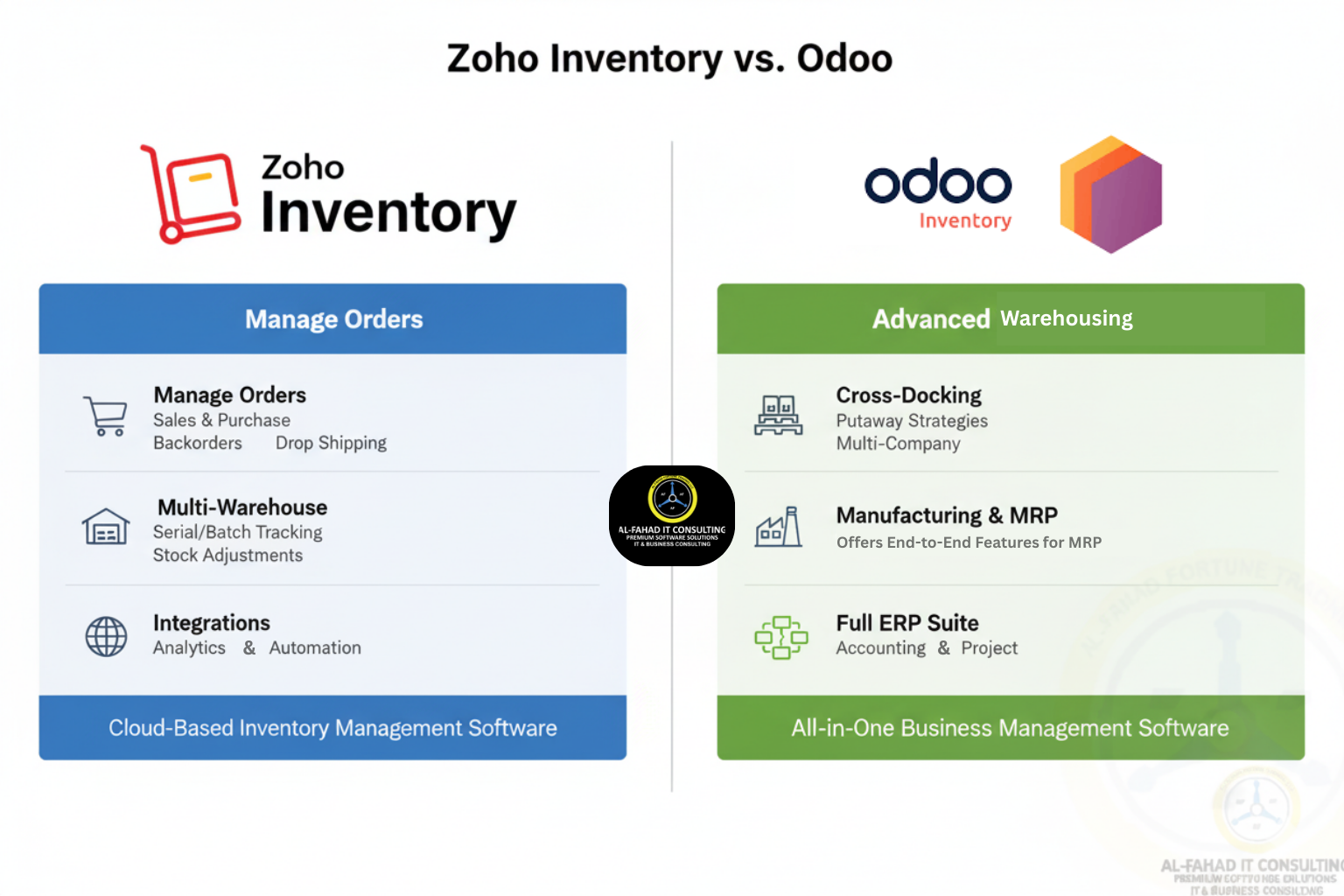
Managing inventory efficiently is critical for modern businesses, especially in multi-channel retail, wholesale, and manufacturing sectors. Choosing the right inventory management software can directly impact operational efficiency, cost control, and business growth. In this comparison, we explore Zoho Inventory vs Odoo, highlighting features, integration capabilities, pricing, and usability to help businesses make an informed choice.
Understanding Zoho Inventory Application
Zoho Inventory app is a cloud-based inventory management system designed for small to medium-sized businesses. It provides a unified platform to track stock, manage orders, and streamline fulfillment. Key features include:
- Multi-channel sales integration (Amazon, Shopify, eBay, WooCommerce)
- Barcode scanning, batch and serial number tracking
- Automated stock alerts and reorder management
- Seamless integration with Zoho Finance, Zoho CRM, and other Zoho inventory apps
- Cloud-based dashboards for real-time insights
Zoho Inventory is particularly suitable for businesses seeking a user-friendly, cloud-first solution with strong integration across the Zoho ecosystem.
Understanding Odoo Inventory Software
Odoo Inventory software is part of Odoo’s comprehensive ERP suite. It is highly modular and caters to businesses looking for an all-in-one solution that combines inventory with accounting, CRM, manufacturing, and e-commerce. Key features include:
- Advanced warehouse management with multi-location support
- Detailed inventory valuation and reporting
- Manufacturing and procurement integrations
- Open-source customization for developers
- Requires setup for cloud hosting or on-premise deployment
Odoo is ideal for businesses with complex workflows or existing ERP requirements, offering flexibility through customization but potentially requiring technical expertise to implement.
Comparative Analysis: Zoho Inventory vs Odoo
Selecting the right inventory management system between Zoho vs Odoo ERP systems requires evaluating multiple factors: usability, scalability, integrations, customization, compliance, and cost. Both Zoho Inventory and Odoo serve different business needs, and understanding their strengths and limitations can help companies make informed decisions.
1. Zoho Inventory vs Odoo: Ease of Use
Zoho Inventory UAE:
- Designed for small to medium-sized businesses (SMBs) and e-commerce sellers.
- Clean, intuitive dashboard with drag-and-drop functionality.
- Minimal training required; non-technical teams can quickly generate invoices, track stock, and manage orders.
- Pre-built workflows simplify tasks like purchase order creation, multi-channel order tracking, and automated stock alerts.
Odoo UAE:
- Powerful ERP suite with inventory as one of many integrated modules.
- Interface is robust but more complex; learning curve is steeper for non-technical teams.
- Initial setup often requires IT support or consultant intervention.
- Best suited for businesses with dedicated IT resources or ERP experience.
Key Distinction: SMBs or businesses seeking quick Zoho implementation with minimal disruption often prefer the Zoho Inventory management system, while Odoo is favored by companies that need full ERP integration with complex operations.
2. Zoho Inventory vs Odoo: Integration & Ecosystem
Zoho Inventory Saudi Arabia:
- Seamless integration with Zoho Finance, Zoho CRM, Zoho Creator, and other Zoho apps.
- Prebuilt connectors for e-commerce platforms like Shopify, Amazon, eBay, and WooCommerce.
- Enables automated workflows between inventory, sales, and accounting modules.
- Supports third-party apps but remains most effective within the Zoho ecosystem.
Odoo Saudi Arabia:
- Part of a comprehensive ERP suite covering accounting, CRM, payroll management, manufacturing, and e-commerce.
- Offers native integration with other Odoo modules and third-party systems, though some connectors may require technical setup.
- Provides greater flexibility for businesses needing multi-department workflow integration.
Key Distinction: The Zoho Inventory dashboard shines in its integrated simplicity, while Odoo excels in providing full ERP connectivity for businesses with diverse departmental needs.
3. Zoho Inventory vs Odoo: Pricing & Scalability
Zoho Inventory Dubai:
- Transparent subscription-based pricing with tiered plans suitable for growing SMBs.
- Cost-effective for multi-channel retailers, small distributors, and service-oriented businesses.
- Scales smoothly as business grows; additional users and warehouses can be added without complex licensing issues.
Odoo Dubai:
- Offers both open-source (self-hosted) and cloud-hosted versions.
- Costs can escalate quickly with multiple apps or enterprise-level modules.
- Ideal for businesses seeking fully integrated ERP solutions across finance, manufacturing, and HR.
Key Distinction: Zoho Inventory management is generally more cost-predictable for SMBs, while Odoo offers enterprise flexibility but may require higher investment and technical resources.
4. Zoho Inventory vs Odoo: Cloud vs On-Premise
Zoho Inventory Riyadh:
- Fully cloud-based, allowing real-time access from anywhere.
- Mobile apps available for iOS and Android, enabling on-the-go stock management.
- Automatic updates and backups are handled by Zoho, reducing IT overhead.
Odoo Riyadh:
- Available in both cloud-hosted and on-premise deployments.
- On-premise deployment requires server infrastructure, IT management, and software updates.
- Cloud version simplifies deployment but may still require module-specific configuration.
Key Distinction: This Zoho Inventory feature is ideal for remote teams and cloud-first businesses, while Odoo provides flexibility for businesses that prefer self-hosted ERP solutions.
5. Zoho Inventory vs Odoo: Customization & Flexibility
Zoho Inventory KSA:
- Limited to the Zoho ecosystem but offers customization via Zoho Creator.
- Suitable for businesses looking for standardized workflows with moderate flexibility.
- Users can automate repetitive tasks like reorder notifications, purchase approvals, and invoicing.
Odoo KSA:
- Highly customizable due to open-source architecture.
- Businesses can modify workflows, develop custom modules, and integrate complex logic.
- Requires IT expertise for deep customization and maintenance.
Key Distinction: Zoho Inventory management software offers easy configuration for business users, whereas Odoo offers extensive customization for technical teams or complex operations.
6. Odoo vs Zoho Inventory: Compliance & Multi-Location Support
Zoho Inventory Bahrain:
- Supports multi-warehouse operations with automated stock allocation.
- Ensures compliance with regional GST, VAT, and tax reporting for GCC countries when integrated with Zoho Finance.
- Ideal for e-commerce, SMB distributors, and businesses operating across multiple locations.
- UAE Corporate Tax reporting integrations (via Zoho Books/Finance).
- Saudi ZATCA e-invoicing compliance (if Inventory is tied with Zoho Books).
Odoo Bahrain:
- Multi-warehouse and multi-company support with detailed audit trails.
- Compliance depends on local configurations and additional module setup.
- More suitable for global companies requiring ERP-wide compliance across regions.
Key Distinction: Zoho Inventory software is simpler for regional compliance; Odoo offers broader, multi-country compliance capabilities but requires more setup.
7. Odoo vs Zoho Inventory: Target Business Suitability
| Feature / Need | Zoho Inventory | Odoo |
|---|---|---|
| Business Size | SMBs, e-commerce, distributors | Medium to large enterprises, ERP users |
| Setup Complexity | Minimal, fast deployment | Complex, requires IT support |
| Multi-Channel Sales | Excellent | Moderate, requires configuration |
| Manufacturing Support | Limited | Strong |
| ERP Integration | Zoho ecosystem | Full ERP suite |
| Cost | Subscription-based, predictable | Flexible, may be higher with multiple apps |
Why Choose Zoho Inventory Management with Al Fahad IT Consulting
Partnering with Al Fahad IT Consulting, a certified premium Zoho consulting partner in the UAE, KSA, and Bahrain, ensures businesses unlock the full potential of Zoho Inventory:
- Expert Zoho implementation and tailored Zoho consultation services
- Optimized workflows for e-commerce, SMBs, and multi-location operations
- Seamless integration with Zoho Finance Plus, Zoho CRM, and other Zoho inventory apps
- Local support ensuring GCC compliance and faster adoption
- 500+ successful client deployments across diverse industries, including shipping, real estate, medical, trading, manufacturing, services, and energy
Partnering with Al Fahad ensures businesses gain real-time dashboards, automated sales and purchase workflows, and fully integrated E-supplier management software, all backed by local expertise.
Conclusion
Zoho Inventory vs Odoo presents a clear choice depending on business needs:
- Choose Zoho Inventory software if you want a cloud-based, user-friendly, and integrated solution with strong support for SMBs and multi-channel retail.
- Choose Odoo software if you require a full ERP system with advanced customization, manufacturing modules, and more technical control over workflows.
With expert guidance from Al Fahad IT Consulting, businesses in the UAE, KSA, and Bahrain can deploy Zoho Inventory efficiently, ensuring compliance, automation, and operational excellence. Zoho offers a world of unified applications for business management.
Zoho Creator creates a custom application within a low-code environment, while Zoho Mail’s email solution boosts email productivity for the entire team. That’s not all, Zoho Recruit offers easy hiring for large enterprises without the hassle of manual documentation.
Check out our famous guides in GCC:
Still unsure? Check out 5 signs if you need Zoho Consulting Partner for your business in GCC
Stay connected to our blog for more engaging and up-to-date information on Zoho products.
FAQs
1. Can Zoho Inventory features integrate with Odoo?
Integration is possible via third-party tools, but Zoho Inventory works best within the Zoho ecosystem.
2. Is Zoho Inventory app suitable for manufacturing businesses?
Yes, for small to medium-sized operations, large-scale manufacturing may benefit from Odoo or other ERP systems.
3. What is the cost difference between Zoho Inventory and Odoo?
Zoho Inventory offers predictable subscription pricing, while Odoo costs vary depending on modules and deployment.
4. Can Al Fahad IT Consulting assist with Zoho Inventory software setup?
Yes, Al Fahad IT Consulting provides expert Zoho implementation services in the UAE, Saudi Arabia & Bahrain, tailored to your business needs.
5. Which platform is easier for non-technical users, Odoo or Zoho Inventory?
Zoho Inventory has a more intuitive interface and a minimal learning curve compared to Odoo.
6. Does the Zoho Inventory dashboard support VAT and ZATCA compliance?
Yes, when integrated with Zoho Books/Finance, Zoho Inventory ensures VAT compliance in the UAE and ZATCA Phase II e-invoicing compliance in Saudi Arabia


Leave a Reply